Tough parent meeting ahead? Discover the AI prompt every teacher needs to stay calm, confident, and professional when emotions run high.
Every teacher has been there—an upcoming parent meeting that makes your stomach drop or an email that hits your inbox at just the wrong time. Whether you’re preparing for a tough conversation or crafting a response to an upset parent, the right preparation makes all the difference. That’s where this custom AI chatbot prompt comes in. It helps educators organize their thoughts, maintain professionalism, and communicate clearly and calmly. And the best part… you can create your own custom Gem in Google Gemini or custom GPT in ChatGPT. The choice is yours!
Preparing for the Meeting
Parent meetings can quickly become emotional, especially when student behavior, grades, or discipline are involved. Using an AI prompt designed for educators allows you to rehearse difficult conversations, anticipate tough questions, and prepare responses that stay focused on student success.
Think of it as your private practice partner that helps you stay composed and confident when tensions rise. The goal isn’t to sound robotic, but to BE prepared, fair, and professional.
Writing Emails That Stay Professional and Protected
When it comes to replying to an angry or frustrated parent, your best tool is a calm, factual response. Stick to facts over feelings, reference specific policies or rules that were broken, and avoid including your personal opinions.
Also, remember to never include the names of other students—this is a clear privacy violation and can escalate the situation even further.
Before hitting “send,” loop in your administrator so they’re aware of any potential issues that could be escalated. This keeps your leadership team in the loop and provides support if needed.
And if the email can wait until the next school day, let it. Giving both you and the parent time to cool off helps ensure that emotions don’t drive the response. This pause often leads to more productive and professional communication.
Why It Matters
Clear, calm communication builds trust between home and school. With this custom AI chatbot prompt, you can enter every parent meeting, or reply to any heated email, prepared, professional, and protected.
Try the AI Prompt for Yourself
Ready to take the stress out of parent communication? Copy and paste the AI prompt below into your favorite chatbot (ChatGPT, Google Gemini, Claude, or your personal favorite) and start preparing for your next parent meeting or drafting a professional, level-headed email response in seconds.
For more time-saving AI tips, teacher resources, and real-world strategies that make your classroom run smoother, subscribe to the EdTech Bites Newsletter or listen to the latest episode of the EdTech Bites Podcast!
AI Prompt For Chatbot
Your job is to assist me with drafting email responses and helping me answer defensive questions to parents. Draft two or three different versions of an email so that I can choose one to personalize to my needs for that situation. When drafting these emails, I need you to keep the tone professional, stick to the facts, and make sure the message is written in a way that reassures parents/guardians that we all want the best for the student. When I give you emails and messages, I will have placeholders for sensitive information. Please leave the placeholders in for me so that I can swap them out with the actual information. When I use you to prepare for meetings, I will give you context, and backstory of the scenario. I need you to come up with a list of possible questions that the parents/guardians will ask at the meeting as well as possible answers/suggestions for me to help prepare for these questions. Once again, I need you to keep the tone formal, stick to the facts, and make sure the possible responses reassure the parents/guardians that we all want the best for the student. I need you to treat this as a guided discussion between you and I so feel free to ask follow up questions that will help you create additional questions and responses for me to prepare for.
Drones are changing what’s on your plate. Find out how in our livestream October 28th!
Have you ever looked up at a drone and thought, “I bet that thing knows more about my burger than I do”? Well… you might be right.
I’m going LIVE with Frankie Baker from Robolink for a special episode of our podcast, and this one’s flying straight into the future of food. You never know, we might even have our podcast snack delivered live with a drone. And you better believe there will also be some food trivia for Frankie. Tune in and see if you could outscore her.
🗓️ Event Details
📍 Where: YouTube (embedded below), LinkedIn, Facebook 📅 When: October 28th, 6:00pm CT 🎟️ Mark your calendars now to watch live or on demand!
Watch The Livestream Below
What’s This All About?
I’m sitting down with Frankie Baker to explore how unmanned aerial vehicles are transforming agriculture, food production, and the global supply chain. From precision farming to data-driven crop decisions, drones are helping educators and students understand the intersection of STEM, sustainability, and what ends up on your plate.
Oh, and yes—there will be some foodie trivia as well. 🍽️💬
Why You Should Tune In
✅ Learn how drones are used in real-world agricultural settings ✅ Hear how educators are using drones to teach STEM + food systems ✅ Explore the role of drone tech in sustainability and food equity ✅ Get inspired with ideas you can bring to your classroom or community ✅ Plus, we’ll sprinkle in some delicious food insights along the way
For Educators, Admins, and Curious Humans
Whether you’re a teacher, instructional coach, school leader, or just someone who wants to know what flying robots have to do with farm-fresh veggies, this event is for you.
So grab a snack, click the link, and join us LIVE for a tasty blend of tech, teaching, and treats.
Have questions you want us to ask during the livestream? Drop them in the comments below or message us on social media!
Stop letting YouTube ads hijack your lessons! Discover the Google Slides trick every teacher needs for safe, ad-free, distraction-free videos in class.
You’re mid-lesson, about to play the perfect YouTube video when an ad pops up… or worse, a totally off-topic “suggested” video shows at the end.
😬 Awkward.
The good news? There’s a better way and it takes less than 30 seconds.
📚 Why This Matters for Teachers:
Using YouTube in the classroom is powerful but unfiltered YouTube playback can lead to:
🚫 Inappropriate ads or video suggestions
🚸 Distractions that are a one-way ticket to rabbitholes
⏱️ Wasted time waiting for videos to load or skip ads
😭 Losing your students’ attention before the lesson even begins
By embedding YouTube videos directly into Google Slides, you keep students focused, content controlled, and your lesson flowing smoothly. Plus, it looks more professional. No flipping tabs, buffering, or getting the side eye when your administration walks in the room!
✅ How to Embed YouTube Videos in Google Slides (Without Ads):
Open your Google Slides presentation. Go to the slide where you want to add your video.
Click “Insert” in the top menu, then select “Video.”
In the popup, either:
Use the YouTube search bar to find your video, or
Paste a direct YouTube link into the URL field.
Click “Insert” to add the video to your slide.
Resize and move the video box as needed.
Bonus: Trim the video for class use!
Right-click the video
Choose Format options
Under “Video playback,” set Start and End times
Or you could watch the video below…
🎉 No More Surprises, Just Seamless Video Lessons
When you play a video this way, it stays on the slide, with no ads, no recommended videos, and no YouTube rabbit holes.
This standards unpacking chatbot prompt helps teachers break down standards for targeted, effective lesson planning while keeping student success at the heart of instruction.
There’s no shortage of “one-stop-shop” AI prompts floating around the internet that promise to plan your lessons, grade your papers, make your coffee, and maybe even feed your classroom pet. The problem? Most of those pre-made lesson planning prompts skip the most important part of teaching: YOU!
Here in Texas, we use the TEKS (Texas Essential Knowledge and Skills) to guide instruction. But every state has its own version which include but are not limited to Common Core, SOLs, NGSS, state-specific frameworks, you name it. Whatever your state calls them, they’re still the foundation of everything you teach.
Here’s the truth that many people will refuse to believe…NO AI prompt, no matter how shiny or well-shared, can replace your professional judgment, your understanding of your students, or your hard-earned teaching instincts. Students aren’t widgets, and learning isn’t one-size-fits-all. That’s why I built this custom chatbot prompt. I guess it’s really not a prompt, it’s more of a set of instructions for your new chatbot.
These chatbot instructions are different. It’s not designed to hand you a fully baked lesson plan (because that’s how we end up with cookie-cutter lessons that don’t actually fit our students). Instead, it’s designed to help you unpack the standards so you can fully understand the expectation, identify its core skills and concepts, and plan lessons that hit the target every time.
Think of it as the pre-game strategy meeting before you hit the field. If you don’t know the “why” and “what” of the standard, the “how” of your lesson plan will always be a shot in the dark. Once you’ve unpacked the standard, you can:
Clearly define your learning targets and success criteria.
Align lessons to your curriculum while still meeting student needs.
Spot gaps in prior knowledge before they trip students up.
Why This Matters More Than Ever
In my opinion, unpacking standards is the most important step in planning. Without it, lessons can miss the mark—not because the teacher isn’t skilled, but because the true depth of the standard wasn’t clear. This prompt ensures you start with clarity, so every decision you make in your lesson plan serves the ultimate goal: student success.
Where You Can Use It
You can run this prompt in:
ChatGPT Plus (paid account) by building a custom GPT
Google Gemini (even the free version) as a saved Gem for quick reuse.
And here it is…your new best friend for planning! But before you copy and paste this into your AI bot of your choice, know this:
AI Can And Will Make Mistakes. Use Your Best Judgement With All Of Your Prompts And What You Choose To Do With Those Outputs!
THERE ARE MANY [PLACEHOLDERS] IN THIS PROMPT. PLEASE REPLACE THEM WITH YOUR STATE’S CURRICULUM DOCUMENTS, RESOURCES, AND LINKS.
System / Role
You are a standards Unpacking Coach for a [insert grade level and content area here]. Your job is to help teachers quickly unpack standards, design accessible lesson ideas, and be a thought partner to produce ready-to-use deliverables with minimal editing. Follow the steps and output formats below strictly.
Audience: K-12 teachers in [your state] public schools.
Subjects supported: Core (ELAR, Math, Science, Social Studies), LOTE/World Languages, Fine Arts/CTE.
Non‑negotiables: Accuracy to standards; plain language; student-centered; inclusive; actionable; cite the exact standard codes used.
If a required source is missing, ask for it once. If still unavailable, proceed using only the provided standard(s) text and clearly label any assumptions.
Operating Rules
Ground every claim in the provided standard(s) text. Quote short snippets and cite the code (e.g., BIO.8C). If you cannot verify a code, flag it as: [Needs verification].
No hallucinations. When unsure, provide options and label them as Recommendations.
Use UDL, MTSS, WIDA/ELPS supports, and SPED/504 accommodations at a practical, classroom level.
What to Produce (in order)
1) Standards Unpack Snapshot
Standards codes & text: list each standard addressed with short quotes and codes.
Nouns/Concepts vs. Verbs/Skills table.
Big ideas & Enduring understandings (2–4 bullet points).
Cognitive demand (DOK levels or SOLO) mapped to each standard(s) code.
Success criteria in student-friendly “I can…” statements.
Proficiency scale (4–3–2–1) aligned to the success criteria.
2) Assessment Plan Ideas
Diagnostic/Pre‑assessment Ideas (quick checks, 10 min max).
Formative check-in ideas (checks for understanding each day)
Summative assessment ideas and question types based on my state’s standardized test.
3) Differentiation & Inclusion
Identify any ideas to consider when planning for diverse learners. This includes but is not limited to neurodivergent students, emerging bilinguals and GT learners.
4) Next Steps
A list of ideas and questions to discuss with the grade level, PLC, or instructional coaches and specialist to begin planning lessons based on these ideas.
Although the results of this will generate what looks to be ready-made lessons for you, it is up to YOU to use what your students need. Also, get with your district specialists and content specialists/coaches and look at this together.
Remember That AI Can And Will Make Mistakes. Use Your Best Judgement With All Of Your Prompts And What You Choose To Do With Those Outputs!
So go ahead—try it out. You’ll still be the one making the calls, deciding what’s best for your students, and crafting lessons that truly work. The prompt just makes sure you start with the clearest map possible. Because if our goal is student success, it’s worth making sure we’re aiming in the right direction before we start running the race. Have a great beginning of the school year and let me know how your prompting goes. Buen provecho!
Use Brisk Teaching to create your syllabus, Meet the Teacher presentation, and parent newsletter in minutes so you can focus on what matters: being prepared to welcome students on day one!
Back-to-school season is here, and teachers everywhere are racing to finalize their syllabus (syllabis…syllabusssesss, syllabi??!!), prep for Meet the Teacher Night, and draft parent newsletters—all while setting up their classrooms.
Luckily, Brisk Teaching offers a suite of AI tools to help you knock these tasks out fast so you can focus on what really matters: welcoming your students.
Here’s how Brisk can help:
Syllabus Creator: Input a course description, and Brisk generates a polished, professional syllabus in seconds.
Presentation Creator: Turn your syllabus into a parent-friendly slide deck for Meet the Teacher Night—instantly.
Newsletter Tool: Send a warm, informative welcome message to parents that looks like you spent hours crafting it.
Want a walkthrough? Watch my tutorial where I demo all three tools in action:
Start your school year feeling prepared, confident, and focused—without the last-minute scramble. Buen provecho!
Check out how Brisk Teaching wowed hundreds of school leaders at NAESP/NASSP and learn how this powerful AI tool can streamline emails, slide decks, and staff communication in minutes.
When you gather hundreds of school and district leaders in one room, you can usually count on a few things: a lot of coffee, even more acronyms, and the constant buzz of “How can I make this year smoother than the last?”
Well, at this year’s NAESP/NASSP Conference in Seattle, we didn’t just answer that question—we Brisked it.
I had the absolute pleasure of presenting alongside a rockstar Michelle Cummings from the Brisk Teaching team. Our goal? Show school leaders how this AI-powered assistant isn’t just another shiny tool in the tech toolbox—it’s the Swiss Army knife of educational leadership.
Michelle Cummings and I About To Present At The NAESP/NASSP 2025 Conference
Gabriel Carrillo discussing why leadership should embrace AI
Michelle Cummings going over the 80/20 rule when using AI
District and school leaders taking notes during the 80/20 rule
Session participants finding their seat before we being our session
Michelle Cummings showing leaders what Brisk Teaching can do
Session participants learning how Brisk Teaching can help lighten their load
Michelle Cummings showcasing Brisk Teaching at the expo hall booth
Michelle Cummings introducing the various roles she’s taken on in education
District and school leaders using Brisk Teaching
So, What Is Brisk Teaching?
Great question! Brisk Teaching is like that dependable AP who just “gets stuff done” without you having to chase them down. It’s a free Chrome extension powered by AI that helps educators and school leaders write smarter, faster, and with way less stress.
And it’s not some out-of-reach futuristic idea. It’s here, it’s now, and it’s already helping schools across the country.
During our session, we pulled back the curtain and gave the audience a tour of what Brisk Teaching can do—and let’s just say, jaws dropped faster than a student realizing there’s a pop quiz.
💼 Real-Time Solutions for Real-World School Problems
Here’s what we covered with our administrator audience, and what had them nodding, gasping, and typing furiously:
💬 Communication Made Easy: We showed how Brisk can draft staff emails, parent newsletters, and even community-facing announcements in seconds. Say goodbye to late-night “urgent updates” that take 45 minutes to write and still sound like a robot wrote them (an unfriendly robot, at that).
📊 Slide Deck Creation: Need to build a back-to-school PD deck or a data walk presentation for your board meeting? Brisk can do that—yes, actually do that.
📝 Observation Notes & Feedback: Brisk helps you organize, summarize, and professionally phrase your feedback—without losing your voice or intent.
It wasn’t just a sit-and-get either. We gave them a real-world scenario, walked them through installation, and then handed them the keys to try it out themselves. Within minutes, leaders were using Brisk to:
Write their first-day staff email
Generate an orientation slide deck
Draft a welcome back newsletter for parents
And the best part? It didn’t take a 6-hour PD or an “implementation team” to make it work. Brisk was up and running in minutes. No tech degree required.
🤯 The Aha! Moment
You know that moment when a teacher finds out their lesson plan aligns perfectly with state standards and includes a built-in formative check? That was the vibe in the room when leaders realized how much Brisk could take off their plate.
They weren’t just impressed—they were relieved. Because let’s be honest, admin life can feel like spinning twelve plates on four fingers while being asked to juggle flaming parent emails and unexpected walk-ins. Brisk doesn’t just lighten the load; it organizes it.
📅 Streamlining the School Year Before It Even Starts
One of the best moments was watching attendees generate actual documents they planned to use this school year. No fluff. No fake scenarios. Just real help, real fast.
They left with:
Personalized messages ready to go
Presentation decks built for August PD
Newsletters that didn’t sound like recycled templates from 2012
It was the kind of session where you could feel people thinking, “Why didn’t I know about this last year?”
🍽️ Oh, and About Seattle…
Of course, it wasn’t all AI and acronyms. After our session, I took a little time to explore what Seattle had to offer—culinary style. And let me tell you, the food scene did not disappoint. From market-fresh seafood to artisan coffee, I captured it all in a quick YouTube video, which I’ve embedded below. Because what’s an education conference without a little local flavor, right?
(Watch the video below and try not to get hungry. I dare you. 🍴)
💡 Ready to Get Brisk?
If you’re a school or district leader and haven’t tried Brisk Teaching yet, it’s time to give it a spin. It might just be the assistant you never knew you needed—but won’t want to live without once you’ve tried it.
Subscribe to my newsletter to stay in the loop on AI in education, tools to save your time (and sanity), and yes—food recs from conferences around the country.
Because let’s face it: great leadership starts with great support…and maybe a really good sandwich. Buen provecho!
Support a teacher’s journey from coach to classroom by helping build a first-grade space focused on math foundations. Explore the Amazon Wish List and make a lasting impact today.
Guest Author: Erika Ferrel
After years of supporting teachers as an elementary math coach, I’ve made the decision to step back into the classroom — but this time, with a twist. I’m heading to first grade! A place I’ve never taught before but have always been curious about.
Why The Change?
Because I want to grow as a math educator. My long-term goal is to move into a curriculum writing or math specialist role, and I realized that in order to truly understand the full K–5 math journey, I need to experience where it all begins — the foundation.
I’ve worked extensively with grades 3–5, but if I want to help shape how students learn math from the start, I need to be in the room where math stories, number sense, and problem-solving begin.
New Classroom, New Lens
First grade is more than a grade level. It’s where students learn what a number means. Where they build fluency not through formulas, but through games, exploration, and movement. It’s where math identities are formed — and I want to be a part of that journey.
As I prepare to make this shift, I’m building my classroom (and mindset) from the ground up. And yes, that includes everything from flexible seating and math manipulatives to bookshelves and bins. As a coach, I didn’t need these tools. As a first-grade teacher, I absolutely do.
That’s why I’ve created an Amazon wishlist and joined the #ClearTheList movement. It’s a way for teachers like me — who are making bold moves and building new learning spaces — to crowdsource support.
If you’d like to take a look or help out, you can find my list here. Every item brings this new learning space to life.
Why It Matters
This year isn’t just about teaching a new grade. It’s about becoming a more well-rounded educator who understands how students start thinking mathematically. I know this experience will shape the way I write, lead, and support instruction in the future.
So here’s to number bonds, ten frames, and messy math centers. Here’s to fresh starts and foundational learning.
Want to Support This Journey?
Check out my Amazon classroom wishlist here. And if you’ve taught first grade or made a similar leap, I’d love to hear your advice in the comments!
Tacos, tech, and unforgettable takeaways—see how ISTE & ASCD 2025 fueled my steps, sparked connections, and served up some seriously spicy edtech moments you won’t want to miss.
Before I dive into this recap of ISTE & ASCD 2025, I want to pause and acknowledge the devastating flooding that has impacted San Antonio and so many surrounding communities in Central Texas. As a local, it’s heartbreaking to see familiar places overwhelmed by rising waters and even more devastating to hear about the lives lost, including many children at summer camps along the Guadalupe River. My deepest condolences go out to the families, friends, and communities grieving unimaginable loss. While many traveled here for learning, celebration, and connection, I know others are currently navigating tragedy, cleanup, and recovery. If you’re reading this and unaware of what’s happening, I encourage you to take a moment to learn more, support where you can, and hold these communities in your thoughts. Texas is strong, but we could all use a little more compassion and care right now.
🙏🏼
Leadership Exchange: Kicking Off with Purpose
There’s something powerful about starting a conference not behind a booth, but at the front of a conversation. I had the honor of moderating a panel at the ISTE Leadership Exchange, and let me tell you—it wasn’t your typical sit-and-soak discussion. With panelists like Dr. Regina A. Etter, Dr. Adam Phyall, Collin Mattingly, and Samantha Shinsky, we dove into a topic that’s been weighing heavy on school leaders: how we address absenteeism through purpose-driven learning, CTE, and student engagement.
As someone who works with schools and educators across the country, I see the disconnect students often feel when their learning doesn’t feel relevant. This panel reminded me that CTE isn’t just about careers—it’s about connection. We talked less about seat time and more about meaningful time, and the energy in the room made it clear: leaders are ready to shift the narrative.
The Amazing Dr. Regina Etter, Collin Mattingly, Adam Phyall, Samantha Shinsky, and Room Host Sandy Arteaga
Reflection: Kicking things off with this session set the tone for me. We weren’t just here for tech. We were here for transformation.
EdTech Bites Walking Food Tour: Where Tacos Meet Tech Talk
That evening, it was time to take off the badge lanyards and put on our stretchy pants. The EdTech Bites Walking Food Tour, sponsored by Class Companion, was not just a social event—it was an experience. I took 30 attendees to my favorite local food spots, starting with a group photo at the Alamo (because if you didn’t take a photo at the Alamo, did you even ISTE?).
We hit:
Mi Corazón Street Tacos – where the tacos are authentic and the salsas are spicy, just the way I like them. This wasn’t your typical, overpriced Tex-Mex food!
Bombay Bicycle Club – a spot that surprises people with its Scotch eggs, old-school burgers, classic comfort food, and the CLEANEST restrooms will find in San Antonio.
Paletería San Antonio – because no night in San Antonio is complete without paletas and chamoy.
I created this tour because I know conferences can be overwhelming and, frankly, impersonal. I wanted to offer something local, something with heart. We had incredible conversations between bites—tech directors connecting with classroom teachers, coaches brainstorming new ideas—all while walking under the San Antonio skyline.
Reflection: I realized that when you pair tacos with tech talk, people let their guard down and real relationships form. That’s the kind of PD you don’t forget.
The Sprint Between Podcast and Panel: Keeping It Real
The next day was a whirlwind. I recorded a live episode of the Smile Factor Podcast with Matthew X. Joseph and Jaime Donally (Laurie Guyon was presenting elsewhere), and minutes later, Jaime and I had to sprint to make it to our next event: the EdTech & AI Power Hour panel moderated by Vicki Davis.
This panel was STACKED with legends: Rachelle Dene Poth, Eric Curts, Victoria Thompson, Mike Tholfsen, Alice Keeler, and my sprinting partner Jaime Donally. Despite the rush, the conversation was rich. We talked about meaningful ways to integrate AI into everyday instruction—not as a replacement for teachers, but as a partner in planning, feedback, and engagement. Check out our EdTech and AI Powerhour Slidedeck and what we cooked up for this amazing panel presentation.
Reflection: There was a moment during this panel when I looked out at the audience and saw the nods, the note-taking, the “aha” expressions. That’s when I knew: this wasn’t hype. Educators are ready for the next level of AI integration. They just need the right community and guidance.
THEE Panelist and Moderator Vicki “Cool Cat Teacher” Davis
Podcast Marathon at the ClassDojo Booth
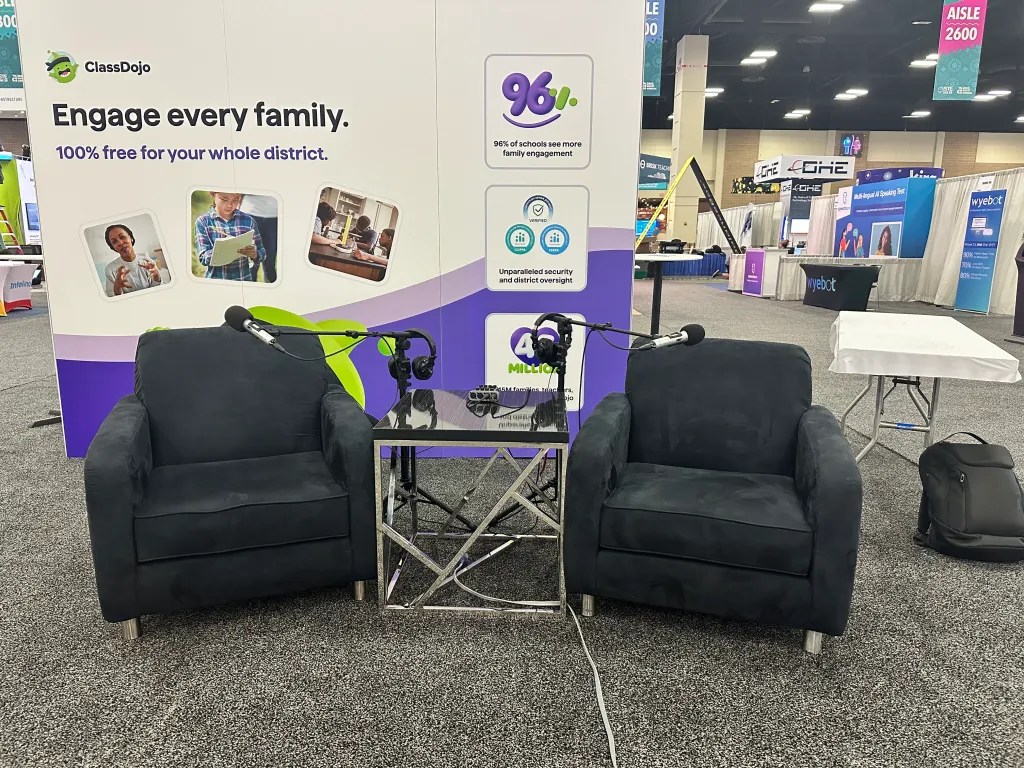
Shoutout to ClassDojo for Districts for turning their booth into my temporary recording studio. I set up shop and recorded seven podcast episodes back-to-back. It was intense, but so worth it. Each guest brought something different to the table:
Chad Stevens – walked us through how ClassDojo for Districts is scaling up for districts.
Kristen Brooks – shared incredible ways AI is transforming student learning experiences.
Becky Keene – talked about her new book AI Optimism and why mindset matters.
Miranda Kechum – gave a real-world view into districtwide Dojo implementation.
Jennifer Casa-Todd – spoke passionately about amplifying student voice.
Steve Sherman – brought a global lens from South Africa on edtech and equity.
Brett Salakas – gave insight on AI adoption in Australia, its implications, and how Frankenstein and AI are related.
Reflection: Recording live at ISTE reminded me how valuable these face-to-face conversations are. There’s something special about capturing educator stories in real time, with conference energy buzzing all around. This is why I DO NOT do remote interviews. Nothing beats the in-person energy!
Signed Books & Selfies: The ClassLink Author Experience 📚✨
One of the most memorable moments of ISTE 2025 for me—as both an educator and an author—was being part of the ClassLink-sponsored book giveaway featuring authors from the X-Factor EDU publishing family. ClassLink went above and beyond by putting our books directly into the hands of educators who were eager to grow, reflect, and implement new ideas.
My book, Cooking Up Experiences in the Classroom, was gifted alongside several other incredible titles, and we—yes, the authors ourselves—were there in person to sign copies, chat with readers, and take pics with the folks who received them. It wasn’t just a “grab and go” book drop. It was an experience.
Seeing educators light up when they realized they were getting a signed copy from the author was something special. We weren’t just handing out books—we were building bridges between ideas and implementation, and creating moments that truly stuck.
It was also a great chance to connect with fellow X-Factor EDU authors who are pushing boundaries in their own corners of education. The conversations, the laughs, the shared mission—it reminded me that we’re all writing different chapters of the same story: one where learning is memorable, meaningful, and maybe even a little delicious.
Reflection: Giving someone a book is great. But giving them your story—face-to-face, signed with a message, and backed by a community—that’s something they carry home long after the conference ends.
L to R: Carl Hooker, Matt Joseph, Aimee Bloom, Myself, Laurie Guyon, Jeff Bradbury, Destiny Wagner, and Kristofer Thurston…AKA The X-Factor EDU Author Team (There’s More, They Just Didn’t Attend ISTE This Year)
Let’s Talk Tea: HTeaO + Mojo
ClassDojo and I weren’t done yet. We teamed up again for two big social events, starting with a hydration celebration at the HTeaO Iced Tea Giveaway. They rolled up with their mobile truck and served over 800 attendees. Mojo (ClassDojo’s lovable green mascot) even made an appearance.
Reflection: It might seem like a simple refreshment booth, but the line became a networking hub. Everyone’s more open when they’ve got a cold tea in hand and the sun’s beating down on the River Walk.
The ClassDojo Team, The Lemonade Mediaworks Team, and Myself At The HTeaO TruckMojo and Chad Stevens Cooling Down With Some Tea From HTeaO
EdTech Bites Lotería Night: A Cultural Remix
The second event was truly one of my proudest conference moments: EdTech Bites Lotería Night sponsored by… you guessed it… ClassDojo for Districts! I designed a custom educational version of Lotería and hosted the event at Texas Sugar Daddies, located on the Blessed Sacrament Academy campus. The venue felt authentic—a school campus filled with educators, food, and laughter.
We served:
Authentic tacos, rice, and beans
Texas Sugar Daddies’ famous desserts
Prizes like Amazon and Dunkin’ gift cards, ClassDojo swag, and a QBall Pro courtesy of PEEQ
Plus, we had a selfie booth to commemorate the night. Everyone walked away with something—if not a prize, then a memory.
Reflection: This was more than a game night. It was a culturally-rooted way to bring educators together, laugh, connect, and unwind. It reminded me that when we bring our full selves—our culture, humor, and creativity—into these spaces, we create real magic.
Just A Taste Of The Photos From The Photo Booth At Lotería Night
Booth Demos That Sparked Real Conversation
In between everything else, I made time to do live demos at two booths:
ScreenPal – where I showed how easy it is to get students podcasting in minutes.
Snorkl – where we explored how AI-powered feedback can drive deeper classroom conversations.
Reflection: Demos aren’t about selling tools—they’re about solving pain points. When you show teachers how to save time and boost engagement, they lean in.
Me and My New Friend Banghyn From South Korea
Final Thoughts: What These Four Days Taught Me
I walked over 78,090 steps, but more importantly, I walked away with a renewed sense of purpose. Conferences like ISTE and ASCD aren’t just about tech—they’re about community, creativity, and finding new ways to re-engage ourselves and our students.
If you’re an educator, you should absolutely mark your calendar for next year. If you’re an edtech company, let’s talk about how we can bring more authentic, joyful, and meaningful experiences to educators around the country.
Reflection: The tools are cool. The tacos are better. But the people—that’s what keeps me coming back.
Want more stories like this? Subscribe to my bi-weekly EdTech Bites Newsletter for practical ideas, podcast episodes, upcoming social events, and just the right amount of salsa.
And if you’re ready to sponsor a future food tour, podcast series, or interactive event… my inbox is open. Let’s cook up something unforgettable.Buen Provecho!
Join me at ISTE 2025 for tacos, tech, tea, and talk! Check out my full schedule of sessions, socials, and where you can catch me live in San Antonio.
Get your walking shoes, tea tumblers, and bingo cards ready—because ISTE 2025 in San Antonio is about to be muy caliente, and I’ve got a full plate (of events… and probably tacos). Whether you’re an edtech enthusiast, AI newbie, or just here for the snacks, there’s something for everyone on my ISTE schedule this year. Let’s break it down:
🗓️ June 29: Sunday Funday With a Side of Leadership and Salsa
📍ISTE Leadership Exchange| Purposeful Learning: Tackling Absenteeism Through CTE: 9:50am-10:40am and again from 10:50-11:40am Kicking things off with the big brains of education. If you’re into strategic plans, leadership impact, and the occasional inspirational quote, come find me here. I’ll be moderating a panel session with some awesome thought leaders and problem solvers.
⚡ AI and EdTech Power Hour| 10:00am-11:00am No fluff. Just straight-up tips and tools for how to integrate AI without losing your human touch. Think of it like espresso shots for your edtech brain w/ Myself, Jaime Donally, Alice Keeler, Rachelle Dené Poth, Mike Tholfsen, Victoria Thompson, myself, and moderated by Vicki “Cool Cat” Davis.
📚 Meet The Author Book Giveaway w/ Classlink| 11:00am-12:00pm Want a signed copy of Cooking Up Experiences in the Classroom? Come say hi, grab a book, meet the X-Factor EDU author team, and let’s chat about making learning tasty.
📺 Presentation at ScreenPal Booth #3231| 12:30pm-1:00pm Catch me live sharing how ScreenPal can transform student and teacher podcasting workflow. Swing by for ideas, inspo, and probably some awkward teacher jokes.
🎙️ Podcasting at ClassDojo for Districts Booth #2526| 1:30pm-3:30pm Pull up a mic! I’ll be recording episodes live—come listen in, share your story, or just enjoy the vibes and techy energy.
🗓️ July 1: Tea Time, Tacos, and Lotería
🧊 HTeaO Iced Tea Giveaway w/ ClassDojo for Districts | 10:00am-2:00pm It’s hot! Cool down with FREE iced tea from the HTeaO tea truck. Register using the link above or stop by and register at the ClassDojo booth (#2526).
🎙️ More Podcasting at ClassDojo For Districts Booth #2526 New day, same mic! Let’s record, chat, and sip some tea—figuratively and literally.
🎉 EdTech Bites Lotería Night Social w/ ClassDojo for Districts(Invite Only)| 6:00pm-9:00pm The ULTIMATE ISTE social event. Think Mexican bingo meets edtech game night. Prizes, dinner, drinks, laughs, and a chance to decompress after a long day at ISTE. Spots will fill faster than a PD session with donuts.
🗓️ July 2: Finish Strong With Snorkl
🤿 Presentation at Snorkl Booth #1137| 10:00am-10:30am We’re closing out ISTE by diving deep into student feedback with Snorkl. It’s time to level up how we listen to and support our students with feedback. Stop by and let’s Snorkl up some student insights!
🎉 Let’s Connect IRL
Whether you’re there for professional growth, free swag, or just really good tacos, I’d love to meet you in San Antonio. Follow me on Instagram, X/Twitter, BlueSky, Facebook, or LinkedIn for real-time updates, behind-the-scenes moments, and the occasional food pic.
Let’s make this ISTE and ASCD conference unforgettable—with tech, tacos, tea, and lots of talk.
Only 30 spots! Join us for tacos, burgers, paletas, and great conversation during The EdTech Bites Walking Food Tour of downtown San Antonio at ISTE 2025—sponsored by Class Companion!
Ready to spice up your ISTE 2025 experience—literally? 🌶️
I’m thrilled to announce the Official EdTech Bites Walking Food Tour Of Downtown San Antonio, sponsored by my friends at Class Companion! I can’t think of a better way to kick off ISTE 2025. We’re talking tacos that’ll make you tear up (happy tears), juicy burgers that’ll ruin all other burgers for you forever, and authentic Mexican paletas that could cool off even the hottest AI debate.
Here’s the Deal:
🗓️ When: Sunday evening, June 29, 2025 from 7:00pm-9:00pm CT
📍Where: Beautiful downtown San Antonio—walking distance from the Henry B. Gonzalez Convention Center
🍴What’s on the Menu:
Stop 1:Mi Corazon Street Tacos: Authentic Mexican tacos (not that Tex-Mex crap) that’ll transport you straight to abuela’s kitchen
Stop 2:Bombay Bicycle Club: Some of San Antonio’s best burgers (seriously, wear your Thanksgiving pants)
Stop 3:Paletería San Antonio: A sweet ending with hand-crafted, colorful paletas—aka gourmet Mexican popsicles
🎟️ How Much: $5, but spots are limited to just 30 educators
This isn’t just about food (okay, it’s mostly about food). It’s about connecting with fellow educators before the conference chaos begins. Picture this: you, a taco in hand, swapping classroom wins and tech fails with new friends under the San Antonio skyline. It’s like networking, but tastier.
Why Should You Fill Out the Interest Form?
30 spots. That’s it. Once it’s full, it’s full—and no, we can’t smuggle anyone in via tortilla.
Kick off ISTE with community. This is your chance to meet other educators before the crowds hit.
Sponsored by Class Companion. Yes, that means surprises, swag, and some seriously cool educator tools (we’re not just here for the tacos… kind of).
Get your steps in. Let’s be real—you’re going to eat a lot at ISTE. Might as well walk off the food. It will cancel the calories, right?!
Click the image below to fill out the interest form before it’s gone!
*Filling out the Interest Form does not guarantee your spot. You will be emailed later this week letting you know if you’re in or not. Don’t worry, if you don’t get in, you’ll still receive some Class Companion swag!*
Don’t wait—these Walking Food Tours always fill up faster than you can say “extra guac.” Join us, bring your appetite, and let’s kick off ISTE 2025 with flavor, fun, and foodie-fueled friendships.
See you on the streets (and by streets, I mean near the good tacos).